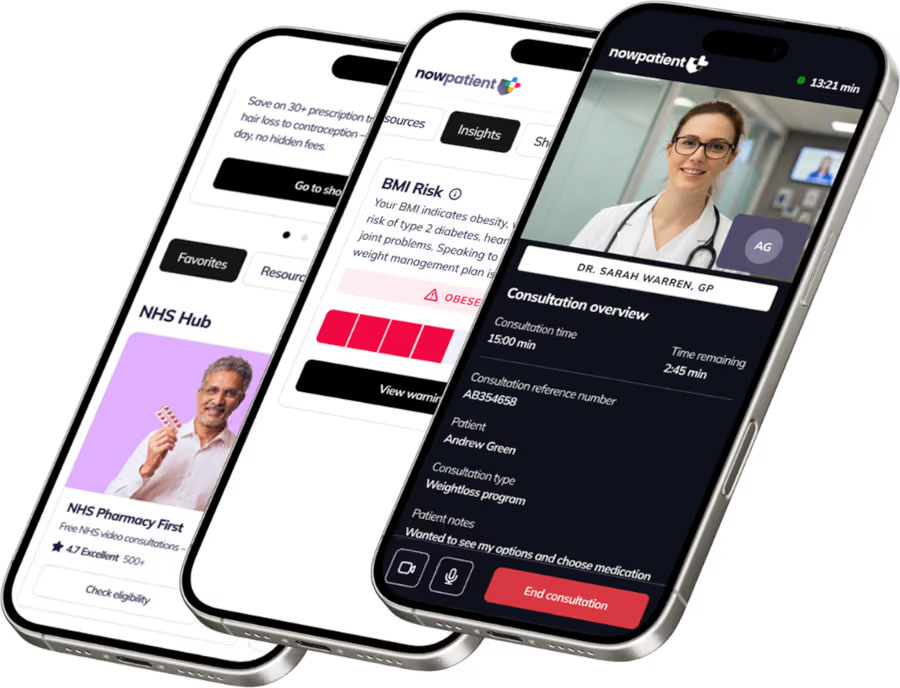

















Rx savings, telehealth treatments & AI health tracking in one place

One app for treatments, drug savings, medication support and AI health tools
Prescription savings
Compare prices on your medications
Over 2,000 medications covered.
Popular drugs
Or
Telehealth Visit
Start your free consultation
Search treatments and get fast delivery.
Popular treatments
Free consultation
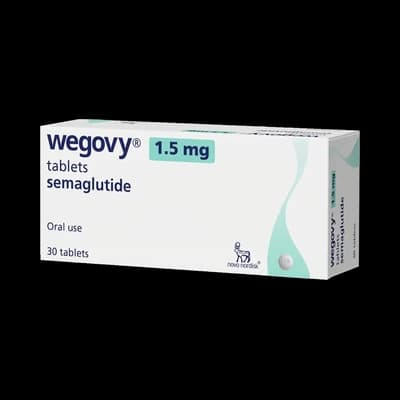
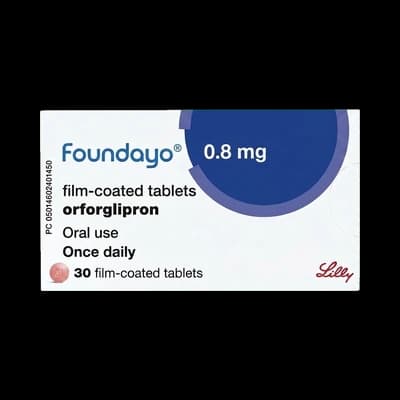
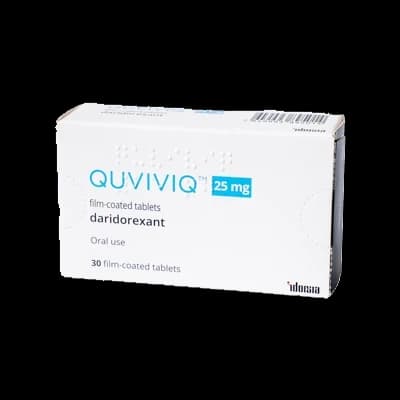



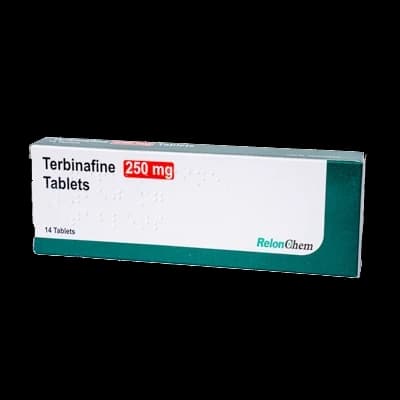
Rated excellent on Trustpilot
Prescription treatments for 30+ conditions, prescribed online and delivered
Sexual Health

Womens Health

Skin

Weight management

General Health
Can't find your condition?
Browse full listCan't find your condition?
Browse full listChoose your plan
Core is free forever. Core+ adds benefits when you need them
CoreFree forever
$0per month
Your complete health profile, Rx savings, telehealth and AI health tools - free, forever.
Included · 26 services
- Symptoms Checker
- AI Deprescribing Advisor
- BMI Risk
- Adiposity Ratio
- Type 2 Diabetes Risk
- Patient Engagement Score
- Air Quality Monitor
- Pollen Meter
- Report Side Effects
- Report Hospital Admissions
- Conditions A-Z
- Healthcare Calculators
- Personalized Learning
- Other Useful Resources
- Medication Reminders
- Home Health Tests
- Genetic Medicine Tests
- Telehealth Visit
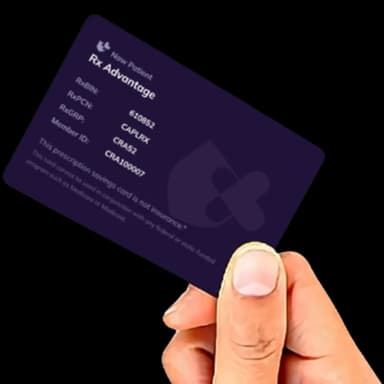
- Rx Advantage Card
- Drug Coupons
- Patient Assistance Programs
- TrumpRx Savings
- Canadian Rx Savings
- Medications
- Weight Loss Programs
- Weight Loss Treatment Cessation Program
As seen in


Health content you can actually trust
Clinically reviewed by UK and US medical professionals, and personalised to your health profile.
Blog
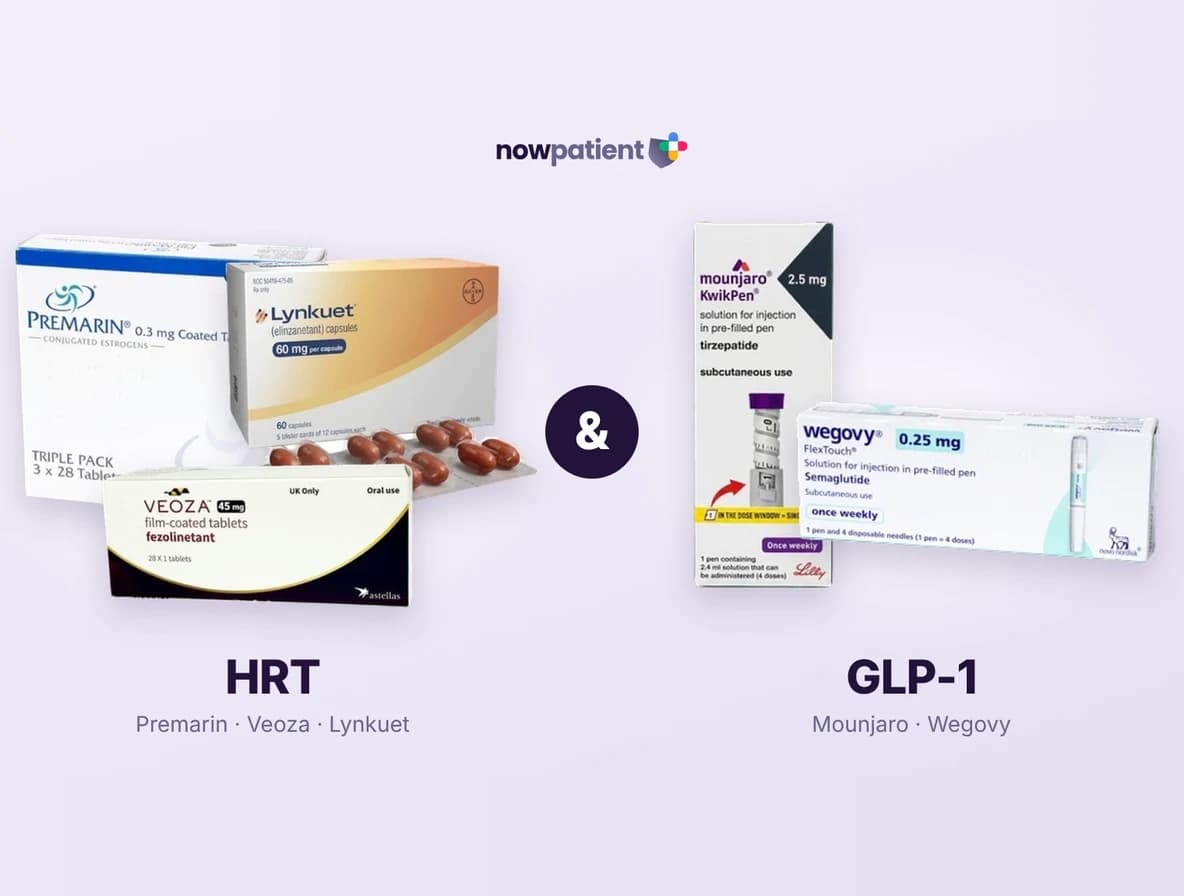
HRT, GLP-1 medications and menopause weight loss: what women need to know
Medically reviewed by Jamie Winn
October 27, 2026
Blog

Can I use my 401(k) to pay for my medication?
Medically reviewed by Stefano Mirabello
October 19, 2026

Blog
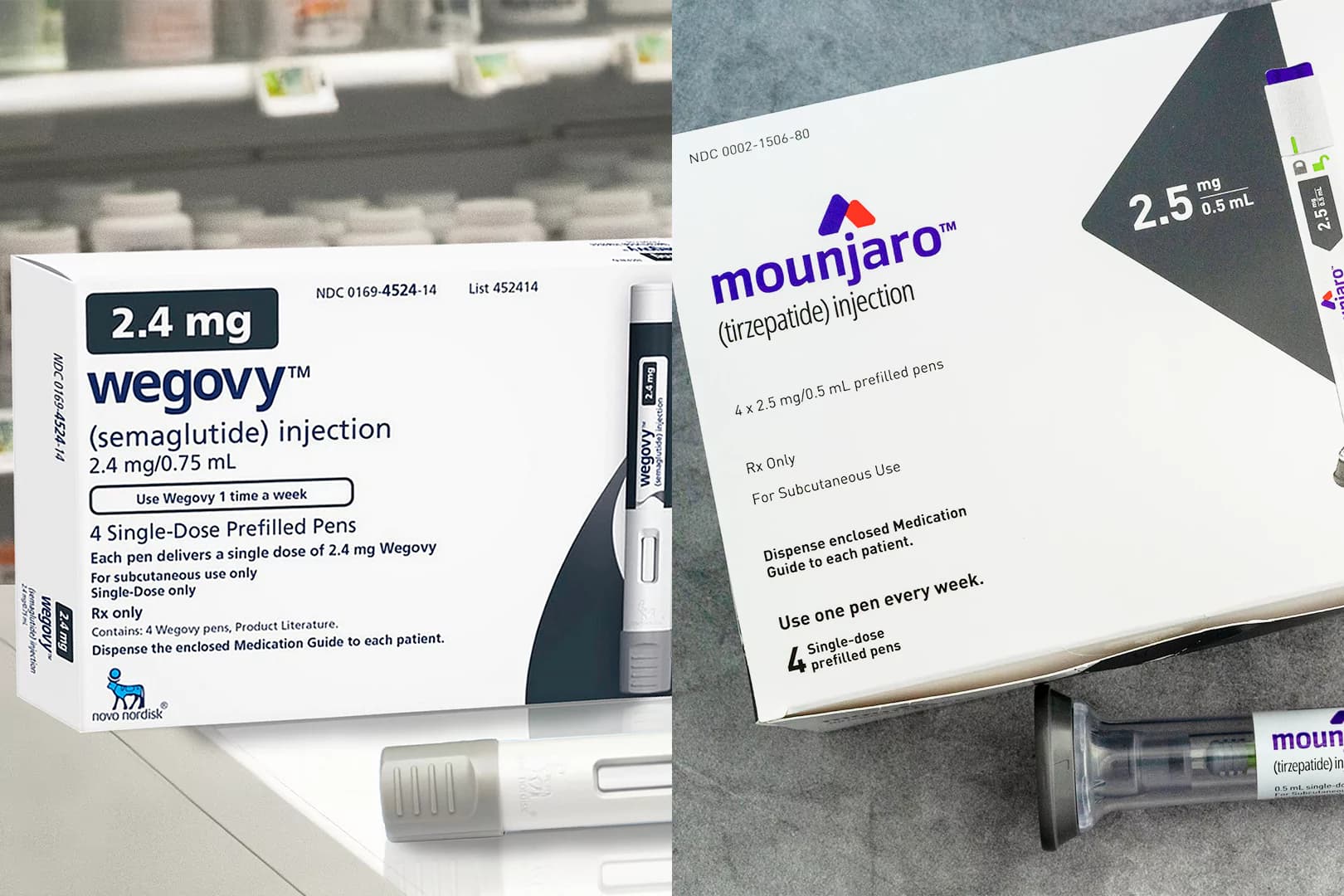
Wegovy & Mounjaro dose conversion: GLP-1 injections to tablets
Medically reviewed by Navin Khosla
October 19, 2026
NowPatient is trusted, regulated and certified














Your health shouldn’t wait.
Consultations, prescriptions, medication delivery, health monitoring – all in one place.

Meet our medical team
We are a broad skilled and passionate group of clinicians with experience of operating in regulated health systems in the United Kingdom & United States. Providing excellent care and advice is at the heart of everything we do.











Frequently asked questions
Answers to common questions about NowPatient, from getting started to managing your account and services.
What is NowPatient?
NowPatient is a digital health technology platform owned and operated by Infohealth Ltd, a licensed online pharmacy serving patients in the UK, US, and Rest of the World.
The NowPatient platform is designed to put you in control of your health, bringing together prescription services, virtual consultations, drug savings programs, and AI-powered health tools, all in one place. Whether you need to buy treatments online, access pharmacy services, find savings on your medications, or monitor your health with smart digital tools, NowPatient brings it all together in one convenient platform.
NowPatient offers:
NHS Online Pharmacy (UK Users Only) – Access NHS services like NHS Online Pharmacy to order repeat prescriptions for home delivery, NHS Pharmacy First to get treatment for minor conditions, NHS Quit Smoking to help you quit smoking, and NHS New Medicine Service to monitor & help you correctly use your newly prescribed medications.
Other NHS services (UK Users Only) – View you GP records and book GP appointments straight from your NowPatient account.
Telehealth Visit - Get treated privately with virtual consultations covering over 30 medical conditions.
Weight Loss Programs – Access clinician-led weight loss injection and tablet programs, including a dedicated off-ramp Treatment Cessation Program
US Drug Savings (US Users Only) – Search drug coupons, patient assistance programs, Rx Advantage Card prices & Canadian Rx savings to help reduce prescription costs.
AI Health Tools – Use AI-driven tools including a Symptoms Checker, AI Deprescribing Advisor, Medication Reminders, BMI Risk, Adiposity Ratio, Type 2 Diabetes Risk, Air Quality Monitor, Pollen Meter and track your Patient Engagement Score.
Health Testing & Monitoring (UK & US Users Only) – Order home health tests and genetic medicines tests
Discover & Learn – Access personalized learning, healthcare calculators, health condition information (Conditions A-Z), and other useful health resources.
Health Surveillance – Report side effects and hospital admissions to support your ongoing care.
NowPatient is operated by an experienced team of medical professionals from both the UK and US, and is certified to international healthcare, medical device, and data security standards, including ISO 9001, ISO 13485, ISO 27001, UKCA, HIPAA, GDPR, DCB0129, and DCB0160.
NowPatient is accessible via web browser or mobile app (iOS and Android).
NowPatient functions as both an online pharmacy and telehealth service, packaged as a Class I software medical device.
Is NowPatient legit?
NowPatient is a fully regulated, clinically governed digital healthcare platform operated by Infohealth Ltd, a licensed online pharmacy registered in England and Wales. It is a Class I software medical device registered with the MHRA (GMDN code 58884).
Pharmacy Regulation
UK pharmaceutical services are provided by Infohealth Pharmacy, regulated and authorised for internet sales by the General Pharmaceutical Council (GPhC) under registration number 1036487. The Superintendent Pharmacist responsible for the safe and effective oversight of all medicines supplied is Mr Amish Patel (GPhC Registration Number 2042705). Every sale of medicines is carried out under the supervision of a registered pharmacist.
Prescribing Services
NowPatient's prescribing services are regulated by the GPhC. The Clinical Safety Officer and Nominated Individual is Mr Navin Khosla. The Medical Director, Dr Ihtesham Sabri, is responsible for the prescribing formulary and treatment guidelines used by all clinicians on the platform. All clinicians are registered with the appropriate regulatory body, undergo DBS checks and licence verification, and their credentials are visible when you book a consultation.
Trusted by the NHS
NowPatient is trusted by the NHS to deliver a range of free pharmacy and healthcare services to patients across England, including NHS Online Pharmacy, NHS Pharmacy First, NHS Quit Smoking, NHS New Medicine Service, GP Appointment Booking, and GP Records Folder.
Security and Accreditations
NowPatient not only meets UK and US data security standards but exceeds them. The platform is regularly audited internally and externally. All data is encrypted in transit and at rest using AES-256 encryption. Key certifications include:
ISO 9001 - Quality Management
ISO 13485 - Medical Devices Quality Management
ISO 27001 - Information Security Management
UKCA - UK Conformity Assessed Medical Device
NHS DTAC - Digital Technology Assessment Criteria
DSPT - NHS Data Security and Protection Toolkit (completed annually)
Cyber Essentials Plus - UK government-backed certification with external audit
HIPAA - US Health Data Protection Compliance
GDPR / UK GDPR - Registered with the ICO
DCB 0129 and DCB 0160 - NHS Clinical Safety Standards
Professional Indemnity and Insurance
NowPatient holds comprehensive professional indemnity and liability insurance covering all digital health, pharmacy, and prescribing services worldwide. Insurance is provided by CFC Underwriting Limited, authorised and regulated by the Financial Conduct Authority (FCA). In the UK, NowPatient is also insured by the National Pharmacy Association for dispensing and telehealth prescribing services. Every clinician on the platform has their personal indemnity insurance and scope of clinical practice validated before they are permitted to provide services.
Registered Trademark
NowPatient is a registered trademark in both the United Kingdom (UK00003816072) and the United States (7510911).
Where is NowPatient located?
NowPatient is operated by Infohealth Ltd and has offices in both the United Kingdom and the United States.
UK Office
1st Floor Offices, 28 Chipstead Valley Road, Coulsdon, Surrey, CR5 2RA, United Kingdom.
UK Telephone: +44 20 388 51 500 | Email: support@nowpatient.com | Office Hours: Monday to Friday, 9am to 6pm GMT.
UK Dispensing Pharmacy
NowPatient's dispensing pharmacy (Infohealth Pharmacy) operates from 28 Chipstead Valley Road, Coulsdon, Surrey, CR5 2RA. It is regulated and authorised for internet sales by the General Pharmaceutical Council (GPhC), registration number 1036487.
US Office
8911 North Capital of Texas Highway, Suite 4200 #1263, Austin, TX 78759, United States.
US Telephone: 1-866-967-1977 | US Fax: +1 512-957-0207 | Office Hours: Monday to Friday, 8am to 5pm EST.
NowPatient is accessible globally via nowpatient.com or through the NowPatient app on iOS and Android.
Physical attendance at either office is not required to access any NowPatient service.
How can I contact NowPatient?
NowPatient is operated by Infohealth Ltd, with offices in both the United Kingdom and the United States. You can reach us by phone, email, or post using the details below.
United Kingdom
Address: 1st Floor Offices, 28 Chipstead Valley Road, Coulsdon, Surrey, CR5 2RA, United Kingdom.
Telephone: +44 20 388 51 500
Email: support@nowpatient.com
Office hours: Monday to Friday, 9am to 6pm GMT
United States
Address: 8911 North Capital of Texas Highway, Suite 4200 #1263, Austin, TX 78759, United States.
Telephone: 1-866-967-1977
Fax: +1 512-957-0207
Email: support@nowpatient.com
Office hours: Monday to Friday, 8am to 5pm EST
What are the Core and Core+ Plans?
NowPatient offers two membership plans, Core and Core+. The plans give you the flexibility to access our platform's services at the level that suits you. You can select you plan when you sign up to create an account.
Core (Free Plan)
The Core plan is completely free. It gives you access to NowPatient's full suite of digital health & tracking tools at no cost. Some AI and health tracking services are limited by fair usage policy.
With Core, you can access:
Online treatments and Virtual Consultations
Weight Loss Programs and Weight Loss Treatment Cessation Program
NHS services including NHS Online Pharmacy, NHS Pharmacy First, NHS Quit Smoking, NHS New Medicine Service, GP Appointment Booking, and GP Records Folder (England users)
US Drug Savings including Rx Advantage Card, Drug Coupons, Patient Assistance Programs, Canadian Rx Savings, and Compounded Rx Savings (US users)
AI Health Tools which include Symptoms Checker, AI Deprescribing Advisor, Medication Reminders, BMI Risk, Adiposity Ratio, Type 2 Diabetes Risk, Air Quality Monitor, Pollen Meter and Patient Engagement Score
Health Testing & Monitoring covering Home Health Testing and Genetic Medicines Test
Private Health Insurance quoatations (England, Scotland, Wales, NI users)
Discover & Learn which covers Personalized Learning, Healthcare Calculators, and Other Useful Resources
Health Surveillance monitoring which includes Report Side Effects and Report Hospital Admissions
Core+ (Premium Plan)
The Core+ plan is NowPatient's premium membership tier, priced at £9.99 per month (UK) or $9.99 per month (US and Rest of the World), billed monthly.
Core+ gives you the same access to all the features available through the Core plan, but now with unlimited usage of AI and health tracking tools. Free shipping is also included for treatments or prescription supplies.
Both plans are available via the NowPatient website at nowpatient.com or through the NowPatient app, available on iOS and Android. Services available may vary depending on your country or region.
How do I create an account?
Creating a NowPatient account
Who Can Create an Account?
You can create an account with NowPatient from anywhere in the world. However, based on your location, the method may differ slightly:
Users in England
Users in United States
Users in other countries
What are the Methods for Creating an Account?
A NowPatient account can be created using any one of the following methods. Availability of methods is based on country.
NHS Login (Users in England Only)
Email (All Countries)
Google Account (All Countries)
Apple Account (All Countries)
How Do I Create an Account?
You can create an account from:
NowPatient website https://nowpatient.com
Download the app from the App Store
Download the app from the Google Play Store
Creating an Account using the Different Methods
Download the App or click the Account Icon on the NowPatient website. You will see the following screen. Now select your country. After you have selected your country, you can choose the sign up method available to you, to begin setting up your account.
Create Account using NHS Login (England Users Only)
NHS login is a simplest and securest way to access all the services that NowPatient offers with one set of credentials. Because NowPatient is an approved NHS integrated partner, you can log in directly using the blue NHS login button on the NowPatient login screen.
When you sign up this way, the following details are shared from your NHS account automatically:
First name and last name
Gender
Date of birth
Home address including postcode
Contact number
Name and address of your GP surgery in England
Tip: After creating your account, go to your profile settings and complete your profile. This unlocks personalized health services relevant to you.
Create Account using Email Address (England Users)
During sign-up, you will need to provide:
First name and last name
Gender
Date of birth
Ethnicity
Home address including postcode
Contact number (landline or mobile)
Tip: After creating your account, go to your profile settings and complete your profile. This unlocks personalized health services relevant to you.
Please remember, if you are an England user and you want to access full NHS services from the NowPatient app, like ordering your repeat prescriptions for home delivery, you will need to connect your account using NHS login or Linkage Keys. You can do this from the account dashboard.
Create Account using Email Address (All Country Users)
During sign-up, you will need to provide:
First name and last name
Gender
Date of birth
Ethnicity
Home address including postcode
Contact number (landline or mobile)
Tip: After creating your account, go to your profile settings and complete your profile. This unlocks personalized health services relevant to you.
Create Account using Google Account (All Country Users)
During sign-up, you will need to:
Select Sign in with Google
Log in with Google, or Join with Google
Review the permissions
Select Allow or Continue
Tip: After creating your account, go to your profile settings and complete your profile. This unlocks personalized health services relevant to you.
Create Account using Apple Account (All Country Users)
During sign-up, you will need to:
Select Sign in with Apple
Log in with Apple
Review the permissions
Select Allow or Continue
Tip: After creating your account, go to your profile settings and complete your profile. This unlocks personalized health services relevant to you.
How do I delete my account & what happens to my data?
A step-by-step guide to closing your NowPatient account, including how we handle your personal health data and what information we're required to retain
How Do I Close My Your Account
Step 1 - Using the navigation, find 'Account Settings'

Step 2 - Select 'Close Account'

Step 3 - To help us improve, let us know why you will be closing your account

Step 4- Enter 'DELETE' when prompted to confirm the deletion of your account

Step 5 - You will receive an email informing you that your account has been closed

What Is the NowPatient Data Retention Policy
There are legal and regulatory requirements for us to retain certain personal data, usually for a specified amount of time. We also retain data to help our business operate and to have information available when we need it. However, we do not need to retain all data indefinitely, and retaining data can expose us to risk as well as be a cost to our business. You can view our Data Retention Policy which explains our requirements to retain data and to dispose of data and provides guidance on appropriate data handling and disposal.
How Is my data handled?
NowPatient's Data Retention Policy sets out how long personal data is kept, why it is retained, and how it is securely disposed of when it is no longer needed.
The policy applies to all personal data held by NowPatient, both physical records (such as letters, contracts, and invoices) and electronic records (such as emails, documents, and audio or video recordings).
It also covers personal data held on NowPatient's behalf by third parties, such as cloud storage providers.
The policy balances two obligations: the legal and regulatory requirement to retain certain records for defined minimum periods, and the data protection principle of storage limitation which requires that personal data is not kept for longer than is necessary for the purpose for which it was collected.
The full policy is available here
Why Does NowPatient Keep My Data?
NowPatient retains personal data for a number of legitimate reasons, including:
Legal and regulatory compliance — certain records must be kept for defined periods under UK law, NHS Codes of Practice, pharmaceutical regulations, and data protection legislation.
Clinical safety — medical and prescription records are retained to ensure continuity of care and to provide evidence in the event of a patient safety incident or legal claim.
Business operations — records such as invoices, order history, and customer service interactions are kept to operate the business effectively and to meet accounting and tax obligations.
Audit and quality assurance — records of clinical audits, complaints, and service delivery are retained to support ongoing quality improvement.
NowPatient does not retain data without a clear business or legal reason, and does not keep data longer than necessary.
How Long Does NowPatient Keep My Medical Records?
Retention periods for medical records are set in line with the NHS Records Management Code of Practice 2021 and the Specialist Pharmacy Services Guidance on the Retention and Secure Storage of Pharmacy Records (England) 2020-2021. The key periods for common record types are summarised below.
Record Type | Minimum Retention Period | Basis |
|---|---|---|
Patient Medical Record (PMR) | Until 10 years after death of patient | NHS Records Management Code of Practice 2016 |
Private prescriptions (non-CD) | 2 years | Human Medicines Regulations 2012 |
Controlled drug (CD) prescriptions | 2 years | Misuse of Drugs Regulations 2001 |
Controlled drug register | 2 years from date of last entry | Misuse of Drugs Regulations 2001 |
CD destruction records | 7 years | Best practice guidance |
Patient complaints | 10 years | NHS Records Management Code of Practice 2016 |
Serious incidents (death or disability) | 20 years | NHS Records Management Code of Practice 2016 |
Minor clinical interventions | 2 years | Best practice |
Significant clinical interventions | 10 years after death of patient | NHS Records Management Code of Practice 2016 |
New Medicine Service (NMS) records | 2 years | NHS Pharmaceutical Services Directions 2013 |
Smoking cessation service records | 2 years | NHS Records Management Code of Practice 2016 |
Immunisation / vaccination records (adults) | 8 years | NHS Records Management Code of Practice 2016 |
Immunisation / vaccination records (children) | Until 25th birthday (or 26th if aged 17 at end of treatment) | NHS Records Management Code of Practice 2016 |
Responsible pharmacist log | At least 5 years | Medicines (Pharmacies) Regulations 2008 |
Clinical protocols (superseded) | 25 years | NHS Records Management Code of Practice 2016 |
Invoices (pharmacy/financial) | 6 complete tax years | Limitation Act 1980 |
Clinical training records | Until 75th birthday or employment plus 6 years (whichever is longer) | NHS Records Management Code of Practice 2016 |
Clinical audit records | 5 years | NHS Records Management Code of Practice 2016 |
External quality control records | 12 years | NHS Records Management Code of Practice 2016 |
For records relating to children, NowPatient follows the NHS Records Management Code of Practice requirement to retain records until the child's 25th birthday (or 26th birthday if the patient was 17 years old at the time treatment was concluded).
How Long Does NowPatient Keep My Account and Marketing Data?
For non-medical personal data, NowPatient applies the following retention periods:
Type of Data | Retention Period | Reason |
|---|---|---|
Customer account / relations records | 6 years from last contact | Business need and limitation period |
Marketing database records | 2 years from last contact | Business need |
Customer complaints (non-clinical) | 6 years from settlement or closure | Business need and limitation period |
Order fulfilment records | 6 years from completion | Limitation period and accounting requirement |
Evidence of marketing consent | While consent is valid; 6 years from withdrawal | Limitation period |
Opt-out / suppression lists | Indefinitely | Business and compliance need |
Website analytics (cookies) | 2 years | Business need |
Bought-in mailing lists | 1 year (list); 6 years (contracts) | Best practice / limitation period |
IT support / helpdesk requests | 3 years from end of support | Business need / contractual obligation |
Technical user account information | 1 year from account closure | Business need / contractual obligation |
How is My Data Stored and Disposed of Securely?
NowPatient takes the security of personal data seriously at every stage of its lifecycle — from collection through to disposal.
Storage
All personal data must be stored in a safe, secure, and accessible manner. Electronic data is backed up at least weekly and maintained offsite. Personal medical data is stored in compliance with the NHS Code of Practice 2021 and Specialist Pharmacy Services Guidance on the Retention and Secure Storage of Pharmacy Records (England) 2020-2021. All data is encrypted in transit and at rest using AES-256 encryption.
Disposal
Once data has reached the end of its required retention period, it is securely destroyed. Physical documents containing personal data are shredded. Electronic data is destroyed in coordination with NowPatient's Data Protection Officer (DPO). A record of destruction is maintained.
Destruction of data is suspended immediately if NowPatient is notified that records are required for active or contemplated litigation, a government investigation, or another legal proceeding. This is known as a litigation hold. Destruction may resume only once the requirement for preservation is formally lifted.
Who is Responsible for Data Retention at NowPatient?
Responsibility for data retention sits across the organisation:
All employees and contractors are required to comply with the Data Retention Policy and Record Retention Schedule. Failure to comply can result in serious civil or criminal liability for the organisation and individuals.
The Data Protection Officer (DPO) is responsible for advising on and monitoring compliance with data protection laws, administering the retention schedule, supervising the destruction of data that has met its retention period, and periodically reviewing and updating the policy. The DPO can be contacted at dpo@nowpatient.com.
NowPatient regularly monitors compliance with the policy and conducts internal and external audits to ensure adherence.
Can I Request Deletion of My Data?
Yes. Under UK GDPR and the Data Protection Act 2018, you have the right to request erasure of your personal data (the 'right to be forgotten') in certain circumstances. However, this right is not absolute and cannot override NowPatient's legal and regulatory obligations to retain certain records for defined periods.
For example, NowPatient is legally required to retain medical records, prescription records, and controlled drug registers for minimum periods set by NHS and pharmaceutical regulations. These records cannot be deleted on request before the end of their mandatory retention period.
If you wish to submit a data subject request — including a request for erasure, access, or correction of your data — please contact the Data Protection Officer:
Email: dpo@nowpatient.com
Post: NowPatient c/o Infohealth Ltd, 28 Chipstead Valley Road, Coulsdon, Surrey, CR5 2RA
Your request will be processed within 7 days. If you are a UK user who has received NHS services from NowPatient, please note that data relating to those services is subject to NHS data retention policies, which may require retention beyond what you have requested.
What Happens if There is a Data Retention Breach?
NowPatient is committed to enforcing its Data Retention Policy across all forms of personal data. If an employee, contractor, or any person believes that the policy has been breached, or suspects that personal data has been retained, handled, or destroyed improperly, they are required to report the incident immediately to their supervisor.
NowPatient operates a strict non-retaliation policy: no individual will face discipline, reprisal, or intimidation for reporting a potential breach in good faith or for cooperating with any related investigation.
The DPO will investigate reported breaches and take appropriate corrective action. Where required by law, NowPatient will notify the Information Commissioner's Office (ICO) and affected individuals of any personal data breach within the required timeframes.
How do I book a telehealth video consultation?
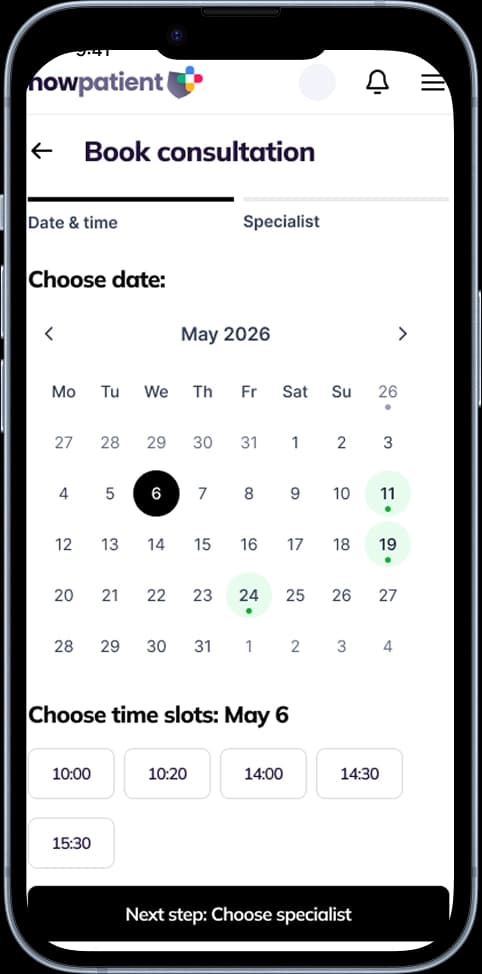
Many of the services that NowPatient provides rely on virtual video consultations. You can Learn how to Book a Video Consultation in 5 Easy Steps, below.
Many of the services that NowPatient provides rely on virtual video consultations. You can Learn how to Book a Video Consultation in 5 Easy Steps, below.
Book consultation for the service
Select consultation date and time
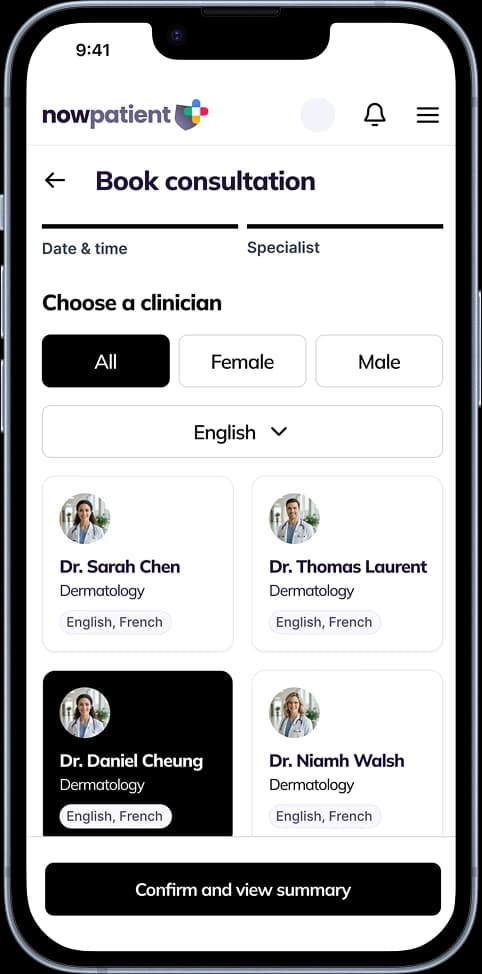
Choose Clinician
View booking summary
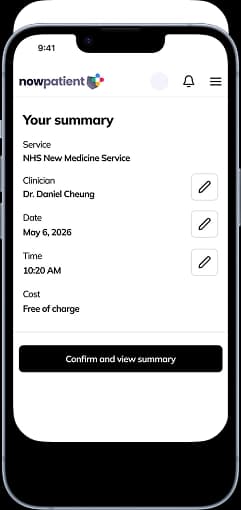
Attend your consultation
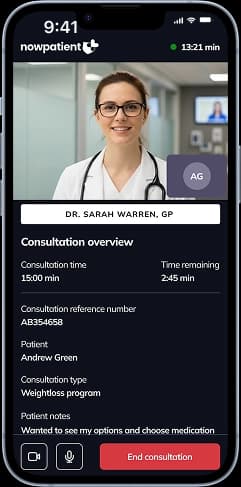
What are video consultations?
Find answers to common questions about NowPatient’s remote video consultations, including how to book, what to expect, your clinician, cancellations, data security, and insurance.
What are remote video consultations?
Remote video consultations — also called synchronous consultations — are live video appointments with a qualified NowPatient clinician. They allow you to receive clinical care in real time from anywhere using a smartphone, tablet, or PC, without needing to visit a practice in person.
Why does NowPatient use live video instead of online questionnaires?
NowPatient believes live video is the safest way to deliver remote care. It allows real-time interaction so your clinician can see and hear you, ask all necessary questions, respond immediately to concerns, and make safe clinical decisions during a single session. Questionnaire-based services do not offer this level of face-to-face interaction.
Are remote video consultations right for me?
Video consultations are suitable for many patients who do not need a physical examination and can communicate via video. However, they may not be appropriate if you require lab tests or a hands-on examination — in those cases, you will need to visit your doctor in person. Our clinicians are not a substitute for your regular doctor if you have a serious or life-threatening condition.
What quality of care can I expect?
Your video consultation will always prioritise safe, high-quality care. Your health and wellbeing are our top priorities. NowPatient continuously monitors and assesses its services to ensure they are safe, effective, caring, and well-led.
Do remote video consultations save money for health systems?
Yes. Traditional healthcare requires in-person visits. NowPatient is the first remote video consultation service that connects patients to a multi-disciplinary team of clinicians, allowing you to book from anywhere in the world using a smartphone, tablet, or PC.
Which NowPatient services require a video consultation?
Several services require a video consultation, including Get Treated Privately for buying treatments online, Weight Loss Programs, Genetic Medicines Test, Home Health Testing, NHS Pharmacy First, NHS Quit Smoking, Weight Loss Treatment Cessation Program, and NHS New Medicine Service. If the service you choose requires a consultation, you will be taken to the booking screen as part of the flow.
How do I book a video consultation?
Navigate to the relevant Service Card on your account homepage and follow the prompts. You will choose a date, time, and clinician. You can filter clinicians by gender and spoken languages. Booking slots are available up to 7 days in advance. Once confirmed, you will receive an email with details on what to expect.
Can I choose my clinician?
Yes. During booking, you can browse the available clinicians trained for your chosen service. You can filter by gender and spoken languages, and you will see each clinician’s full name, licence number, and specialist credentials before you select.
How far in advance can I book?
Booking slots are available up to 7 days in advance.
Can I add notes for my clinician before the consultation?
Yes. When choosing your consultation date, you can add notes to help the clinician prepare for your session.
Who are the prescribing clinicians?
NowPatient’s prescribing clinicians are board-certified pharmacists, nurses, or doctors who can prescribe any medicine for any medical condition, subject to accepted accreditation and good clinical practice. Each clinician is registered with their respective regulatory body — for example, pharmacist independent prescribers in England are registered with the General Pharmaceutical Council (GPhC).
How do I know the clinician is qualified?
When you book, you can see the clinician’s full name, licence number, and specialist credentials. Every clinician undergoes an extensive background check, including a Disclosure and Barring Service (DBS) check, and a rigorous licence verification process.
Who oversees the medications and conditions that can be treated?
The formulary of medications and conditions treated is controlled, governed, and continuously risk-assessed by NowPatient’s Medical Director, Dr. Ihtesham Sabri.
Do I need to update my health profile before booking?
Yes. All patients must complete or update their health profile before booking. This includes current medications and supplements, known allergies, existing medical conditions, previous surgeries, family medical history, current symptoms, and in some cases blood pressure readings, height and weight, and certain blood test results. A complete profile helps your clinician prescribe safely.
Why does my clinician need my medical history?
Your complete medical history helps your clinician identify potential drug interactions, allergies, and contraindications before making recommendations. This protects you from adverse reactions and ensures all advice or treatment is appropriate for your specific health situation.
What is the blood pressure measurement tool?
The NowPatient app can measure your blood pressure using your smartphone’s front-facing camera — no cuff or wearable required. It is the world’s only cuffless blood pressure check, classified as a Medical Device conforming to EU CE and UKCA Class I standards. CE Class IIa conformity is expected in 2025. You need a recent iOS or Android phone (not available on desktop).
How do I take a blood pressure reading?
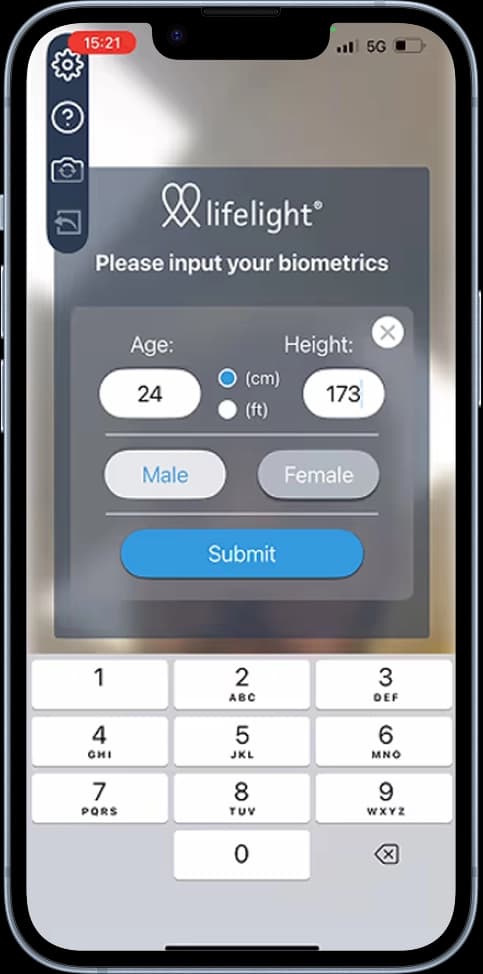
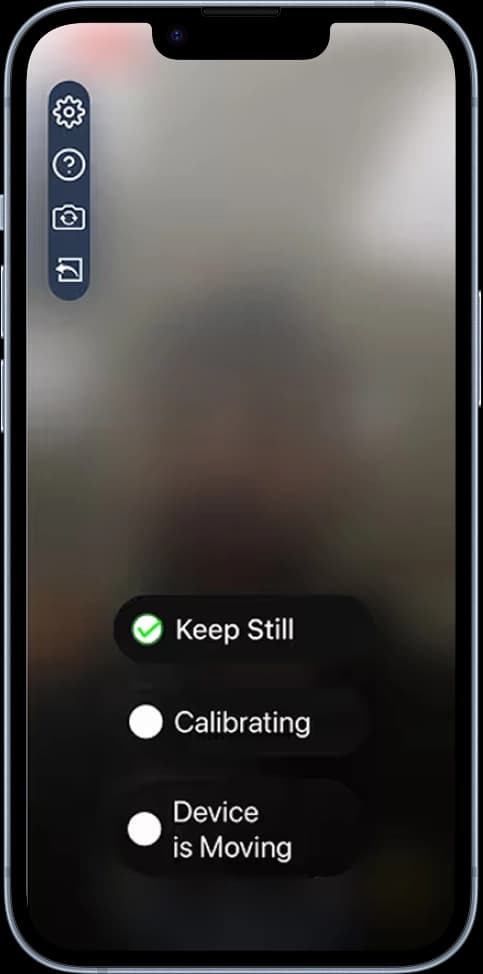
If your service requires a blood pressure reading, you will be prompted during the booking flow. Read and agree to the disclaimer, enter your age, height, and gender, then follow the on-screen steps. We recommend a well-lit room with a stable Wi-Fi connection. The screen will tell you when to stay still.
What should I do before my consultation?
Ensure NowPatient has access to your device’s microphone and camera. Bring your ID — your clinician will verify your identity for your safety. You can also bring a carer, friend, or family member if they are in the same location as you; let your clinician know at the start of the appointment.
What happens during the consultation?
Your clinician will introduce themselves and confirm your identity. You will be reminded that you must disclose any medical conditions, illnesses, operations, and current medications, and that you must provide accurate, honest responses. Withholding or providing false information can severely harm your health. Your clinician will then conduct the assessment for your chosen service.
What kind of outcomes can result from the consultation?
Depending on the service you have booked, the clinician will discharge their clinical assessment. This may lead to outcomes such as the issuance of a prescription, guided counselling, or discussing test results.
Will my doctor be informed?
With your consent, and if the terms of the service require it, the clinician may inform your doctor of any outcome. We recommend agreeing to this, as your doctor is responsible for your overall care and should have a record of the consultation and any plans agreed.
Will the clinician offer general health advice?
Your clinician may take the opportunity to offer general health advice, including guidance on healthy living or stopping smoking.
Do I need to show ID during the consultation?
Yes. Your clinician will ask to see your ID to confirm they are treating the right person. This is required for your safety.
Can I end the consultation at any time?
Yes. You can end your consultation at any time if you feel it is necessary.
What happens after the consultation?
You will receive a post-consultation notification summarising the outcome of your appointment, any referrals made to your doctor, and any advice given by your clinician. You may also receive a short survey about your experience — we encourage you to complete it, as your feedback helps us improve the service.
Where can I find my referral letter?
If a referral letter was issued, you can view a copy in the ‘Documents’ section of your account.
How do I complete my order if treatment is prescribed?
If treatment was prescribed as part of a booked service, it will appear in your Cart. Go to your Cart, complete the NHS Exemption Declaration if applicable, select ‘Checkout’, choose your delivery address and method, confirm billing, review your order, and submit payment. NowPatient never handles your payment details — all payments are processed securely by our banking partner.
Can I get medication advice from NowPatient?
Yes. If the service you booked led to a prescription being issued, NowPatient’s pharmacists are on hand to provide medication advice and counselling across all dispensing services. If you have any questions about your prescribed medication, the pharmacy team is available to help.
How do I cancel a consultation?
Cancel at least 24 hours in advance by navigating to the consultations section of your account, selecting ‘Upcoming Consultations’, choosing the appointment, and selecting ‘Cancel’.
What happens if I miss appointments?
NowPatient has a threshold of two missed appointments before booking rights are temporarily revoked. You will be notified after each missed booking. If you believe this is incorrect or had genuine reasons, you can raise a ticket with the support desk.
How do I know video consultations are safe?
NowPatient has specific safeguards and protocols in place. The video technology platform is certified to the highest industry standards of data security and clinical
governance.
Are my consultations confidential?
Yes. NowPatient follows strict GDPR requirements and is HIPAA compliant, ensuring Personal Health Information (PHI) is handled securely. Legal requirements ensure your data is managed with the utmost confidentiality. Records are maintained of all processing, and breaches are reported if they occur.
How is my data protected?
NowPatient meets and exceeds UK and US data security standards, demonstrated through regular internal and external audits. Externally audited accreditations include ISO27001, DTAC, DSPT, and Cyber Essentials+.
Where is my data stored?
Data residency is a key priority. UK-based data remains solely in the UK. US data is governed by HIPAA-prescribed security protocols. All data centres align with the highest standards of security and privacy, safeguarded through regular external audits.
Is NowPatient insured for the services it provides?
Yes. NowPatient holds comprehensive professional indemnity and liability insurance covering all digital health, pharmacy, and prescribing services worldwide. Insurance is provided by CFC Underwriting Limited, a specialist insurer authorised and regulated by the Financial Conduct Authority (FCA).
Why does it matter if my healthcare provider is insured?
You should always check that your healthcare provider is fully insured. This gives you peace of mind that the care you receive is fully safeguarded.
Are video consultations suitable for me?
Undecided about video consultations? Find out if they are safe and suitable for you.
Why does NowPatient use live video consultations instead of questionnaires?
NowPatient uses real-time video because it is the safest way to deliver remote care. It allows your clinician to see and hear you, respond immediately to your situation, ask follow-up questions, and address any concerns you raise on the spot — all within a single session.
Are video consultations right for me?
Video consultations are suitable for most patients who do not need a physical examination and can communicate via video. They may not be appropriate if you require hands-on examination or lab tests, in which case you will need to visit a doctor in person. They are also not a substitute for your regular doctor if you have a serious or life-threatening condition.
Which NowPatient services require a video consultation?
Several services require a consultation before treatment can be prescribed, including:
Buying treatments online
Weight loss programs
Genetic medicine tests
Home health testing
NHS Pharmacy First
NHS Quit Smoking
NHS New Medicine Service
How do I book a video consultation?
From your account homepage, navigate to the relevant Service Card and follow the prompts. You will choose a date, time, and clinician, enter safety information (including an emergency contact and consultation address), and confirm your booking. Slots are available up to 7 days in advance, and you will receive confirmation by email, in-app notification, and push notification.
Can I choose my clinician, and what information will I see about them?
Yes. When booking, you can browse available clinicians for your chosen service and filter by gender and spoken language. You will see each clinician’s full name, licence number, and specialist credentials before making your selection.
How do I prepare for my consultation?
Before your appointment, complete or update your health profile, which may include:
Current medications and supplements
Known allergies and adverse reactions
Existing medical conditions
Previous surgeries or hospitalisations
Family medical history (where relevant)
Current symptoms or health concerns
Height and weight (for BMI calculation)
Blood pressure readings (where required)
Ensure NowPatient has access to your device’s camera and microphone, and bring valid ID, as your clinician will verify your identity. You may also bring a carer or family member if they are with you in person — just let the clinician know at the start.
How does the blood pressure check work?
For services that require it, the NowPatient app uses your smartphone’s front-facing camera to measure blood pressure without a cuff or wearable. It is classified as a Class I Medical Device (CE and UKCA certified). You will be prompted to take a reading during the booking process on a compatible iOS or Android device.
What happens during the consultation?
Your clinician will introduce themselves, verify your identity, and remind you of your responsibility to provide honest and accurate information. They will then carry out a clinical assessment relevant to your chosen service, which may result in a prescription, counselling, or discussion of test results. With your consent, they may also inform your regular doctor of the outcome.
Will my doctor be told about my consultation?
Only with your explicit consent, or where it forms part of the service terms you agreed to. NowPatient strongly recommends agreeing to this, as your doctor is responsible for your overall care and should have a record of any consultations and agreed plans.
What happens after my consultation?
You will receive a post-consultation notification summarising:
The outcome of your appointment
Any referrals made to your doctor
Any advice given by your clinician
If a prescription was issued, it will appear in your Cart. You may also receive a short feedback survey, which NowPatient encourages you to complete.
How do I collect a prescribed treatment?
Go to your Cart via the account navigation.
Complete any NHS exemption declarations if applicable.
Select Checkout.
Choose your delivery address and method.
Confirm your billing address.
Review your order and submit payment.
Your order is then sent to NowPatient’s regulated online pharmacy for processing and dispatch.
Who are NowPatient’s clinicians?
NowPatient’s clinicians are board-certified pharmacists, nurses, or doctors registered with their respective regulatory bodies (e.g., the General Pharmaceutical Council for pharmacist independent prescribers in England). All clinicians undergo DBS checks and rigorous licence verification. The formulary of medications and conditions is governed by the Medical Director, Dr. Ihtesham Sabri.
Are my consultations confidential and secure?
Yes. NowPatient is GDPR compliant and HIPAA compliant, meaning your personal health information is handled securely and with full confidentiality. The platform is certified to the highest industry standards for data security and clinical governance.
How is my data protected and stored?
NowPatient holds several externally audited accreditations, including:
ISO27001
DTAC
DSPT
Cyber Essentials+
UK data is stored solely within the UK; US data is governed by HIPAA protocols. Regular internal and external audits are conducted to maintain these standards.
Is NowPatient insured?
Yes. NowPatient holds comprehensive professional indemnity and liability insurance covering all digital health, pharmacy, and prescribing services worldwide, provided by CFC Underwriting Limited, which is authorised and regulated by the Financial Conduct Authority (FCA).
How do I cancel a consultation?
Navigate to the Consultations section of your account.
Select Upcoming Consultations.
Choose the relevant appointment.
Click Cancel and confirm.
Please cancel at least 24 hours in advance.
What happens if I miss an appointment?
After two missed appointments, your booking rights will be temporarily revoked. You will be notified after each missed booking. If you believe a missed appointment was recorded in error, or had a genuine reason, you can raise a ticket with the NowPatient support desk.
How do online video consultations work and what should I expect?
NowPatient delivers all clinical services through live, real-time video consultations. This step by step guide walks you through every stage of the process, from booking your appointment to receiving your treatment.
Step 1 — Check you are eligible for a video consultation
Video consultations are suitable for most patients who do not need a physical examination. They may not be appropriate if you:
Require hands-on physical examination
Need laboratory tests that cannot be done remotely
Important: Video consultations are not a substitute for your regular doctor if you have a serious or life-threatening condition.
Step 2 — Complete your health profile
Before booking, ensure your health profile is up to date. Your clinician will use this information to provide safe, personalized care. You may need to provide:
Current medications and supplements
Known allergies and adverse reactions
Existing medical conditions
Previous surgeries or hospitalisations
Family medical history (where relevant)
Current symptoms or health concerns
Height and weight (for BMI calculation)
Blood pressure readings (where required)
Step 3 — Check your device is ready
Make sure:
NowPatient has permission to access your camera and microphone
You have a stable internet or Wi-Fi connection
You are using a compatible smartphone, tablet, or PC
Step 4 — Select your service
Log in to your NowPatient account and navigate to the relevant Service Card on your homepage. Follow the prompts for the service you need (e.g., NHS Pharmacy First, Weight Loss, Buying Treatments Online). Please remember, some services have eligibility requirements before you can book a consultation.
Step 5 — Choose a date
Select your preferred consultation date. You can add notes at this stage to help the clinician prepare for your session. Click Continue.
Step 6 — Choose a time
Select your preferred appointment time from the available slots and click Continue. Slots are available up to 7 days in advance.
Step 7 — Choose a clinician
Browse available clinicians trained for your chosen service. You can filter by:
Gender
Spoken languages
Each clinician’s full name, licence number, and specialist credentials are displayed. Select your preferred clinician and click Continue.
Step 8 — Review your booking
Check the summary of your appointment and read the Pre-consultation Requirements for tips on how to prepare. Click Continue.
Step 9 — Provide safety information
Enter your:
Consultation address (where you will be during the call)
Emergency contact details
You can also opt in to receive an SMS reminder 30 minutes before your appointment.
Step 10 — Confirm your booking
Click Confirm Booking. You will receive:
An in-app confirmation pop-up
Push and in-app notifications
A confirmation email with details of what to expect
Step 11 — Take your blood pressure via the app (if required)
Some services require a recent blood pressure reading before your consultation. If prompted during booking, use the NowPatient app’s built-in blood pressure tool:
Open the blood pressure tool when prompted.
Read and agree to the disclaimer.
Enter your age, height, and gender.
Follow the on-screen instructions — stay still when prompted.
Ensure you are in a well-lit room with a stable Wi-Fi connection.
The NowPatient blood pressure tool uses your smartphone’s front-facing camera — no cuff or wearable required. It is classified as a Class I Medical Device (CE and UKCA certified). Available on iOS and Android only.
Step 12 — Join your video consultation
At your scheduled time, open the NowPatient app and join your consultation.
Step 13 — Identity verification
Your clinician will introduce themselves and verify your identity. Please have your ID ready.
Step 14 — Confirm your declarations
You will be reminded that you must:
Complete the consultation for yourself
Disclose all medical conditions, illnesses, and operations
Disclose all prescription medications you are currently taking
Provide accurate and honest responses throughout
Important: Withholding or providing false information can severely harm your health and may have life-threatening consequences.
Step 15 — Your clinical assessment
Your clinician will carry out an assessment relevant to your chosen service. Depending on the service, this may lead to:
Issuance of a prescription (this will be added to your cart)
Guided counselling
Discussion of test results
General health advice (e.g., healthy living or smoking cessation)
At any time, you will be able to upload any relevant documents that may be useful for your attending clinician. For example, if you wish to share lab tests or doctor letters, you can simply upload them securely through the consultation session.
Step 16 — Consent to inform your doctor (recommended)
With your consent, your clinician may inform your regular doctor of the consultation outcome. NowPatient strongly recommends agreeing to this, as your doctor is responsible for your overall care.
You can end the consultation at any time if you feel it is necessary.
Step 17 — Receive your post-consultation summary
You will receive a notification summarising:
The outcome of your appointment
Any referrals made to your doctor
Any advice given by your clinician
If a referral letter was issued, you can view it in the Documents section of your account.
Step 18 — Complete your order (if treatment was prescribed)
If your clinician prescribed a treatment, follow these steps:
Go to your Cart via the account navigation.
Complete any payment exemptions, such as NHS Exemption Declaration if applicable.
Select Checkout.
Choose your delivery address and delivery method.
Confirm your billing address.
Review your order and submit payment.
Your order will be sent to NowPatient’s licensed online pharmacy for processing and dispatch.
Step 19 — Complete the feedback survey
You may receive a short survey about your experience. NowPatient encourages all patients to complete it. Your feedback helps improve the service for everyone.
Cancellations & Missed Appointments
To cancel an appointment:
Go to the Consultations section of your account.
Select Upcoming Consultations.
Choose the appointment you wish to cancel.
Click Cancel and confirm.
Please cancel at least 24 hours in advance.
Missed appointments: After two missed appointments, your booking rights will be temporarily revoked. Contact the NowPatient support desk if you believe this was applied in error.
Need Help?
Contact Method | Details |
|---|---|
UK Phone | +44 20 388 51 500 |
US Phone | 1-866-967-1977 |
Hours (UK) | Monday–Friday, 9am–6pm GMT |
Hours (US) | Monday–Friday, 8am–5pm EST |
Support |
How do I measure my blood pressure before a video consultation?
Certain medications which NowPatient prescribes, require a blood pressure reading to be taken. This is to ensure that the medication can be safely prescribed for you.
How to Take Your Blood Pressure Reading Using NowPatient
Book Consultation
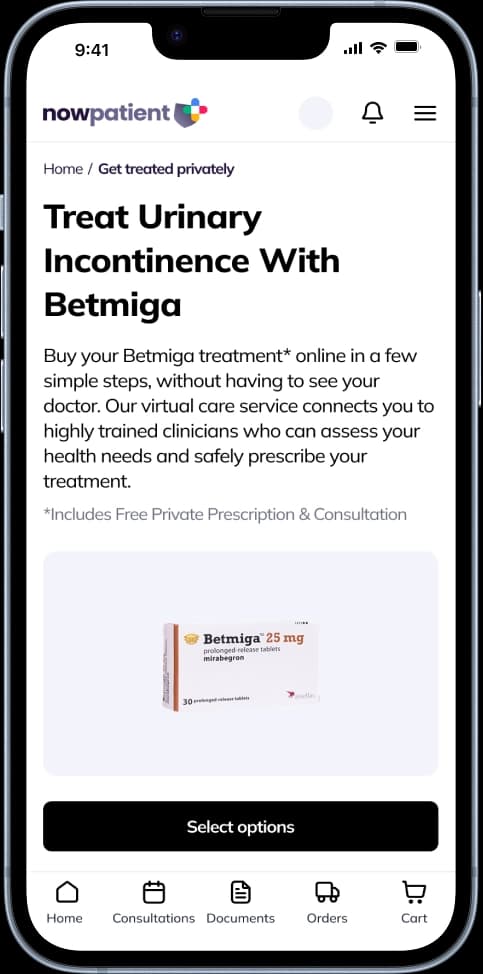
Getting Started — If you are on a mobile device and you are booking for a service that requires your blood pressure reading, you will be prompted to take your blood pressure reading via the NowPatient app.
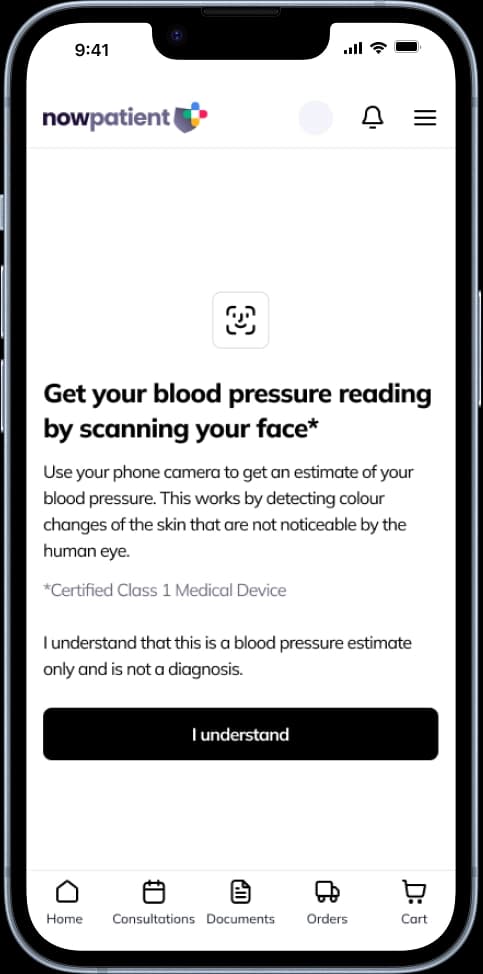
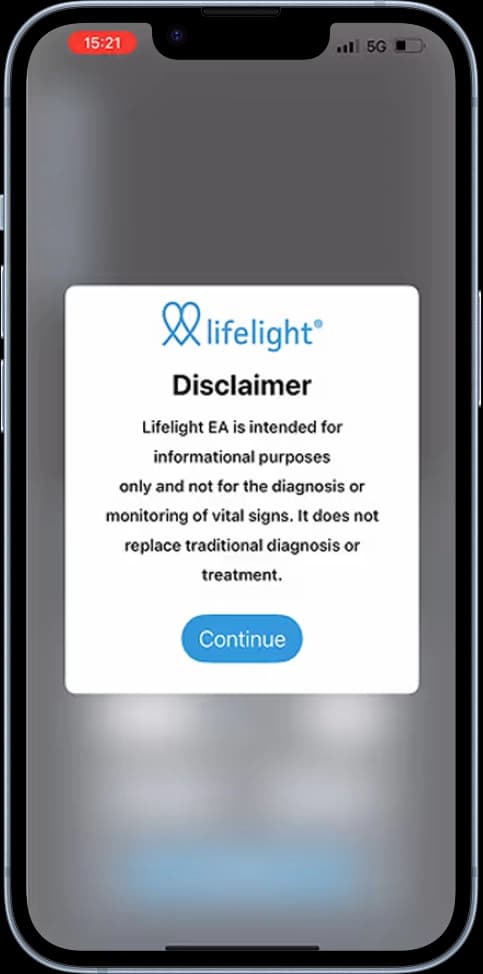
Read and Agree With the Disclaimer
Enter Personal Details — We will require your age, height and gender before starting your scan.
Follow the Steps on the Screen — Whilst taking your blood pressure reading, we recommend that you are in a well-lit room with a stable WiFi connection. The steps on the screen will inform you when you must stay still.
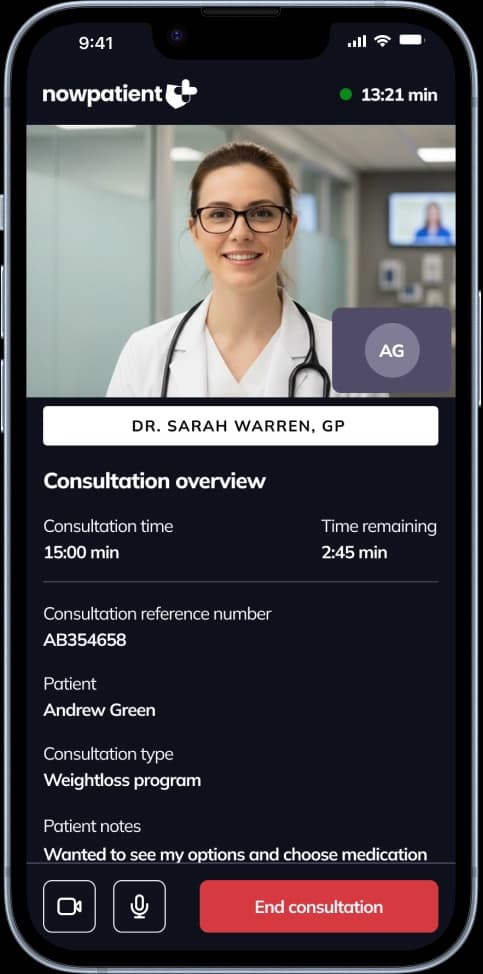
Attend Consultation — Now that our clinician has your most recent blood pressure reading, they can make safe prescribing decisions.
Which Medications Require a Blood Pressure Reading Before Being Prescribed?
For certain medications or condition treatments, your clinician may need your most recent blood pressure reading. The NowPatient app uses an innovative, cuffless approach — your smartphone’s front-facing camera measures your blood pressure while held in front of your face. It is the world’s only blood pressure check without a cuff or wearable.
The blood pressure tool is classified as a Medical Device and conforms to EU CE and UKCA Class I Medical Device standards. CE Class IIa conformity is expected in 2025. You will need a recent iOS or Android smartphone with a front-facing camera (not available on desktop devices).
Treatment Name | Blood Pressure Reading Needed? |
Acyclovir | Yes |
Aklief | Yes |
Aknemycin Plus | Yes |
Almotriptan | Yes |
Aquipta | Yes |
Avomine | Yes |
Betmiga | Yes |
Blerone | Yes |
Blissel Gel | Yes |
Brevinor | Yes |
Cerazette | Yes |
Champix | Yes |
Cialis | Yes |
Cilique | Yes |
Cytisine | Yes |
Detrusitol | Yes |
Detrusitol | Yes |
Dianette | Yes |
Ditropan | Yes |
Duac | Yes |
Duloxetine | Yes |
Eletriptan Hydrobromide | Yes |
Elleste duet | Yes |
Elleste solo | Yes |
Emla | Yes |
Emselex | Yes |
Epiduo | Yes |
Erythromycin/Zinc acetate | Yes |
Estradiol | Yes |
Estradot | Yes |
Estradot Conti | Yes |
Estring | Yes |
Estriol | Yes |
Evorel | Yes |
Evorel conti | Yes |
Evorel sequi | Yes |
Evra | Yes |
Famciclovir | Yes |
Famvir | Yes |
Femodene | Yes |
Femodene ED | Yes |
Femodette | Yes |
Femoston | Yes |
Gedarel 20/150 | Yes |
Gedarel 30/150 | Yes |
Hana | Yes |
Hezkue | Yes |
Imigran | Yes |
Katya | Yes |
Kliofem | Yes |
Kliovance | Yes |
Levest | Yes |
Liraglutide | Yes |
Livial | Yes |
Lizinna | Yes |
Logynon | Yes |
Logynon ED | Yes |
Lovima | Yes |
Lymecycline | Yes |
Mariosea | Yes |
Marvelon | Yes |
Maxalt Melt | Yes |
Mercilon | Yes |
Microgynon 30 | Yes |
Microgynon 30 ED | Yes |
Millinette 20/75 | Yes |
Millinette 30/75 | Yes |
Mounjaro | Yes |
Mysimba | Yes |
Neditol | Yes |
Neditol | Yes |
Nitrofurantoin | Yes |
Norgeston | Yes |
Noriday | Yes |
Norimin | Yes |
Norinyl-1 | Yes |
Nuvaring | Yes |
Obgemsa | Yes |
Orlistat | Yes |
Orvanette | Yes |
Oxybutinin | Yes |
Oxytetracycline | Yes |
Phenergan | Yes |
Preblacon | Yes |
Premarin | Yes |
Premique low dose | Yes |
Priligy | Yes |
Promethazine | Yes |
Qlaira | Yes |
Relpax | Yes |
Rigevidon | Yes |
Rizatriptan | Yes |
Saxenda | Yes |
Sayana Press | Yes |
Scopoderm | Yes |
Scopolamine | Yes |
Sildenafil | Yes |
Spedra | Yes |
Sumatriptan | Yes |
Sunya | Yes |
Synphase | Yes |
Tadalafil | Yes |
Tamiflu | Yes |
Tamsulosin | Yes |
Tetralysal 300 | Yes |
Tolterodine | Yes |
Tolthen | Yes |
Treclin | Yes |
Trimethoprim | Yes |
Triregol | Yes |
Vagifem | Yes |
Vagirux | Yes |
Valaciclovir | Yes |
Valtrex | Yes |
Vardenafil | Yes |
Veoza | Yes |
Viagra | Yes |
Vydura | Yes |
Wegovy | Yes |
Wegovy Tablets | Yes |
Xenical | Yes |
Yasmin | Yes |
Yentreve | Yes |
Zineryt | Yes |
Zoely | Yes |
Zolmitriptan | Yes |
Zomig | Yes |
Zyban | Yes |
How do I checkout an order?
Learn how to checkout any product that you add to your Cart
Checking out is the same regardless of the service you are choosing, whether that is a prescription product or service.
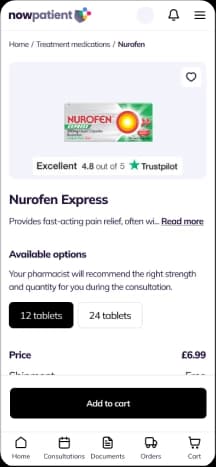
Add product to cart — Choose your product and start the booking process in a few simple steps.
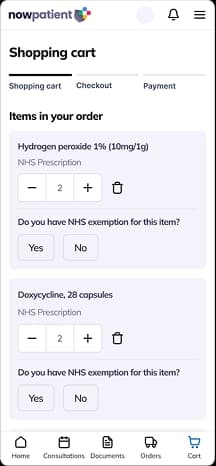
Go to cart — Review items in your cart, adjust quantities and check available options.
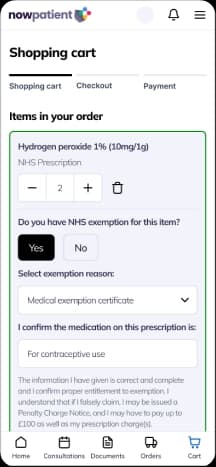
Complete the NHS Exemption Declaration — Complete the NHS Exemption Declaration for each item in your cart.
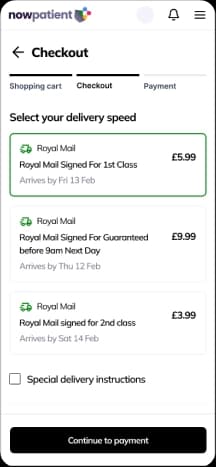
Go to checkout, select delivery address — Enter or select your shipping address and add any additional delivery instructions.
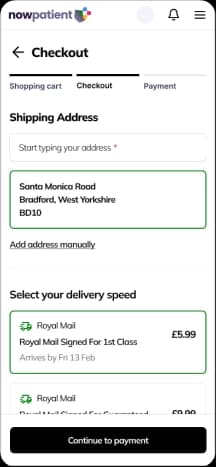
Select delivery method — Choose your preferred delivery speed and see the estimated delivery dates.
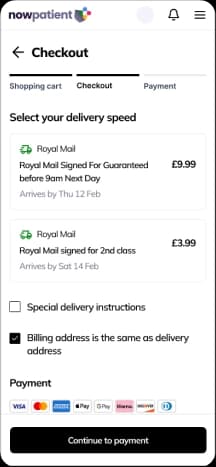
Confirm billing address — Confirm or update your billing address for the payment.
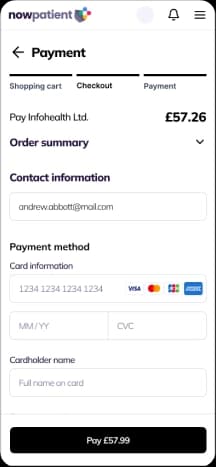
Complete payment — Enter your payment details and review your order summary before confirming.
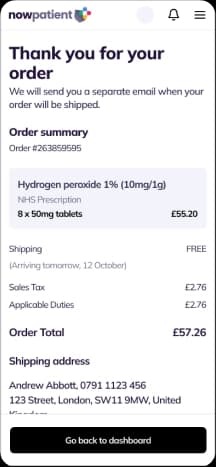
Order complete, return to the homepage — Your order is confirmed. We'll send you a separate email when your order is dispatched.
How can I track & manage my orders?
Once you have checked out and paid, you can track and manage all your orders in one place. This guide explains how to find your orders, understand what each status means, and what to do if an order needs your attention.
Which NowPatient services are included in Order Management?
Order Management covers every order you place across NowPatient, including:
Shop
Telehealth Visit
Canadian Rx Savings
NHS Pharmacy First
Home Health Testing
Weight Loss Programs
NHS Online Pharmacy
Genetic Medicines Test
Compounded Rx Savings
NHS Quit Smoking
Where do I find my orders?
Tap the Orders icon in the floating navigation menu. Your orders screen opens straight away, organised into three clear categories: Current, Past, and On Hold.
What are the three order categories?
Your orders are split into three tabs to make them easy to find:
Current — orders that have been placed but not yet delivered to you.
Past — orders that have been successfully fulfilled and delivered.
On Hold — orders that need your attention before they can move forward.

How far back does my order history go?
Your complete order history is available from the day you created your NowPatient account. There is no cut-off date — all past orders are always there when you need them.
What do the order statuses mean?
Each order shows a status so you always know exactly where things stand. To see the status of a specific order, go to the Current Orders tab and tap on the order. The order detail will expand to show the invoice value, item descriptions, and current status.
Status labels can vary slightly between services — for example, a prescription order may show: Pending Processing → Dispensed → Dispatched → Delivered. The meaning is always clear from the label.
Will I be notified when my order status changes?
Yes. Every time your order status changes, NowPatient sends you a push notification, an email, and an in-app notification. You can also view all your notifications at any time in the ‘Notifications’ section of your account homepage.
How do I see the full details of an order?
Tap any order in your list to expand the order detail view. You will see everything in one place: the items ordered, quantities, pricing, delivery address, estimated delivery date, and current status.
What does On Hold mean?
On Hold means your order has been paused and cannot progress until something is resolved. This might be a prescription that needs verifying, a payment issue, or a request for more information. Your order will never be cancelled without warning — you will always receive a notification telling you exactly what is happening and what to do next.
How will I know if my order is on hold?
You will receive a push notification, an email, and an in-app notification as soon as your order is placed on hold. Each notification will explain the reason and the steps you need to take. You can also see the On Hold status on the order itself in the On Hold tab of Order Management.
Why might my order be placed on hold?
The most common reasons include:
Your prescription needs to be verified or has expired
A valid prescription has not yet been received by the pharmacy or supplier
Additional clinical information is required before your order can be dispensed
A payment issue that needs to be resolved
Stock or supply issues affecting the medication or product ordered
What do I need to do if my order is on hold?
Resolving a hold is straightforward:
Open the order from the On Hold tab in Order Management.
Read the on-screen instructions — a notice on the order will explain the reason and what is needed.
Complete the action required. This might mean uploading a new prescription, updating your payment details, or contacting NowPatient support.
Once done, your order will resume automatically. You do not need to do anything else.
Will my order be cancelled if I do not act straight away?
Not automatically. Your order stays on hold until the required action is completed — there is no timer that cancels it without warning. If a deadline ever applies, your notification will make this clear upfront.
Can I cancel an order that is on hold?
Yes. If you decide you no longer want to proceed, contact the NowPatient support desk and the team will cancel the order for you. Please note that cancellation terms can vary depending on the service and how far the order has already been processed.
How do I find a past order?
Go to the Past Orders tab in Order Management. You can scroll through the list or use the filter or search to find a specific order by service or date.
Can I reorder from a past order?
No. Because NowPatient orders can include products from multiple services, it is not possible to simply repeat a past order. To place a new order, start a fresh order through the relevant service.
Can I get a copy of a past order or invoice?
Yes, in two ways:
Open the past order and tap ‘View Invoice’. This lets you view and print the full order detail.
Alternatively, go to your Documents section, filter by Document Type and Date Range to find the order, and print from there.
Who do I contact if I have a problem with my order?
The NowPatient support team is ready to help:
UK: +44 20 388 51 500 — Monday to Friday, 9am–6pm GMT
US: 1-866-967-1977 — Monday to Friday, 8am–5pm EST
Email: support@nowpatient.com
You can also contact the team directly from within the app using the in-app help or contact function.
My order says delivered but I have not received it. What should I do?
Get in touch with NowPatient support as soon as possible and have your order reference number to hand. The team will look into it with the courier or pharmacy and let you know the next steps, which may include sending a replacement or arranging a refund.
What do I need to know about deliveries?
From dispatch times to cold-chain packaging, here's everything you need to know about receiving your NowPatient order.
How will my order be delivered?
All orders are shipped in discreet and unmarked packaging, making them suitable for delivery to your home, workplace, or a neighbour. For your protection and safety, your first order can only be delivered to the address that is registered with NowPatient. Future orders can be delivered to any address you choose.
Where does NowPatient deliver?
NowPatient delivers to the UK, Europe, and worldwide. NHS services (such as NHS Online Pharmacy and NHS Pharmacy First) are available to patients in England only. Our private services and online pharmacy are available across the UK, with international shipping available to European and worldwide addresses. Please note that some remote or rural postcodes may experience slightly longer delivery times, and tracking availability for worldwide orders may vary depending on the destination country.
What delivery options are available?
UK orders are shipped via Royal Mail Tracked 24 & Signed, with next-day delivery as standard. European deliveries are sent via Royal Mail Tracked and typically arrive within 3–5 working days. Worldwide deliveries take 7–21 working days and are tracked where available in the destination country.
Delivery charges apply for most services. Shipping is included in the price for patients using our Telehealth Visit service in England, and is free for NHS Quit Smoking Service orders.
When will my order be dispatched?
We aim to dispatch all orders placed Monday to Friday before 3:00pm on the same working day. Orders placed after 3:00pm, or over weekends and bank holidays, will be dispatched on the next available working day.
Do you offer next-day delivery?
Yes. All UK orders are shipped via Royal Mail Tracked 24 & Signed, which delivers next day as standard. To qualify for same-day dispatch, please place your order before 3:00pm Monday to Friday. Orders placed after this time, or over weekends and bank holidays, will be dispatched on the next available working day.
Do you deliver temperature-sensitive or cold-chain medications?
Yes. We use a specialist courier service for all thermo-sensitive deliveries (such as insulin, GLP-1 weight loss injections like Mounjaro, and other refrigerated medications). Cold chain-validated packaging is used throughout the entire delivery process to ensure product quality, safety, and efficacy are always maintained.
How is cold-chain packaging handled?
Temperature-sensitive products are packed using validated cold chain packaging that maintains the required storage temperature throughout transit. Your parcel will normally receive an estimated delivery window from the courier on the day of delivery, so you can ensure someone is available to receive it. If you have concerns about receiving a cold-chain delivery, please contact our customer care team in advance.
Do you deliver controlled drugs?
Yes. Controlled drugs are delivered using a specialist courier service to ensure secure and compliant handling in accordance with UK regulations. These deliveries will always require a signature upon receipt.
How do I track my order?
Once your order has been dispatched, you will receive a dispatch notification containing your tracking details. You can also view your tracking information at any time in the 'Notification Feed' section on your account dashboard. Tracking is available for all delivery options.
Will I receive status updates about my order?
Yes. NowPatient uses a structured notification system to keep you fully informed throughout the order process. Every time your order status changes — from approval through to dispatch and delivery — you will be notified immediately. Notifications are sent via email and appear in the 'Notifications' section of your account homepage (accessible via the bell icon). This includes updates when your treatment is approved, dispensed, and shipped.
What order statuses will I see?
You can expect to see the following key status updates: Order Received, Prescription Approved (where applicable), Order Dispensed, Dispatched (with tracking reference), and Delivered.
Can I change my delivery address?
For your first order, delivery must be made to the address registered with NowPatient at the time of sign-up. This is a safety measure to verify your identity and protect your account. From your second order onwards, you can select from any saved address in your account or add a new delivery address during checkout.
Can I have my order delivered to my workplace or a neighbour?
Yes. From your second order onwards, you can have your medication delivered to any address, including your workplace, a family member's address, or a neighbour. All parcels are sent in discreet, unmarked packaging, so the contents will not be identifiable.
How do I update or add a new delivery address?
You can manage your delivery addresses directly within your NowPatient account settings. Additional addresses can also be added during the checkout process when selecting your delivery address. Simply select 'Add a new address' and enter the required details.
What should I do if my order hasn't arrived?
If you have not received your order within the expected delivery window, please first check your tracking details in the 'Notification Feed' section of your account dashboard. If after 10 days of dispatch you have still not received your delivery, please contact our customer care team and we will work to resolve the issue as quickly as possible.
What if my order arrives damaged?
If your order arrives in a damaged condition, please do not use the medication and contact our customer care team immediately. Please retain the original packaging and, if possible, take photographs of the damage, as this will help us raise a claim with the courier and arrange a replacement for you as quickly as possible.
My tracking shows delivered but I haven't received my parcel — what should I do?
First, check with any neighbours or safe locations at your property (such as a porch or outbuilding). If you still cannot locate your parcel, please contact our customer care team and we will investigate the matter with the courier on your behalf.
What happens if I miss my delivery?
If you miss a delivery, the courier will typically leave a card with instructions for rescheduling or collecting your parcel from a local depot. For cold-chain deliveries, it is particularly important to arrange redelivery promptly to maintain product integrity. If you have concerns about a missed cold-chain delivery, please contact our customer care team for guidance.
If you ship international, do I need to handle duties?
No. Our prices include customs duties, wherever you are located.
How are NHS repeat prescriptions delivered?
Once your GP has approved your prescription request, NowPatient's regulated online pharmacy will dispense and dispatch your medication. You will be notified at each stage of the process. NHS prescriptions are dispatched via Royal Mail Tracked 24 & Signed for next-day delivery, provided the order is placed before 3:00pm on a
working day.
Is delivery free for NHS prescriptions?
Yes. There is a small cost applied to all NHS prescription deliveries. This allows us to keep our service operational. NHS Quit Smoking Service orders qualify for free delivery. If you are using the Telehealth Visit service in England, shipping is included within the consultation and treatment price.
Can I specify a preferred delivery date for my NHS prescription?
Yes. You can add special instructions for your delivery directly in the prescription checkout flow on NowPatient.
When you're placing your NHS prescription order, you'll see a freeform text box where you can type any specific requests you have for the delivery. This includes things like:
Requesting delivery on a particular day
Asking for smaller or discreet packaging
Leaving notes for the courier (e.g. safe place to leave the parcel, building access details)
Any other preferences relating to how your order is delivered
Just enter your instructions in the box before completing your order, and our fulfilment team will see them when preparing your shipment. We'll do our best to accommodate your request, though some instructions may depend on the courier service used for your delivery.
How are private prescription medications delivered after a telehealth consultation?
Following your telehealth or video consultation, if a treatment is prescribed, it will be added to your cart automatically. After you complete checkout and payment, your order is sent to NowPatient's regulated online pharmacy for processing. You will receive status updates at every stage and your medication will be dispatched in discreet, unmarked packaging.
How quickly will I receive medication after my consultation?
If your consultation and checkout are completed before 3:00pm on a working day, we aim to dispatch your medication the same day. The total time to delivery will depend on the delivery method you select at checkout.
Is the packaging discreet?
Yes. All NowPatient orders are shipped in plain, unmarked packaging with no branding or indication of the contents on the outside. The packaging is suitable for delivery to your home, workplace, or a neighbour.
Can I create special instructions for my delivery?
Yes. You can add special instructions for your delivery directly in the checkout flow on NowPatient.
When you're placing your order, you'll see a freeform text box where you can type any specific requests you have for the delivery. This includes things like:
Requesting delivery on a particular day
Asking for smaller or discreet packaging
Leaving notes for the courier (e.g. safe place to leave the parcel, building access details)
Any other preferences relating to how your order is delivered
Just enter your instructions in the box before completing your order, and our fulfilment team will see them when preparing your shipment. We'll do our best to accommodate your request, though some instructions may depend on the courier service used for your delivery.
Will my parcel require a signature?
Yes. All UK orders are sent via Royal Mail Tracked 24 & Signed, which requires a signature upon delivery. Controlled drug deliveries will always require a signature regardless of the shipping method. For cold-chain deliveries, a signature is required to ensure someone is available to receive the medication promptly and maintain product integrity. For European and worldwide orders, signature requirements may vary depending on the destination country and the service available.
How do I contact NowPatient about a delivery issue?
You can reach our customer care team through the NowPatient website or app. Go to your account and use the Help or Contact Us section to raise a query. Our team is available to assist with any delivery-related concerns including missing parcels, tracking queries, or delivery address changes.
What are NowPatient's customer care hours?
Please visit the Contact Us section of the NowPatient website or app for up-to-date information on our customer care operating hours and available contact methods.
Can I create special instructions for my delivery?
Yes. You can add special instructions for your delivery directly in the checkout flow on NowPatient.
When you're placing your order, you'll see a freeform text box where you can type any specific requests you have for the delivery. This includes things like:
Requesting delivery on a particular day
Asking for smaller or discreet packaging
Leaving notes for the courier (e.g. safe place to leave the parcel, building access details)
Any other preferences relating to how your order is delivered
Just enter your instructions in the box before completing your order, and our fulfilment team will see them when preparing your shipment. We'll do our best to accommodate your request, though some instructions may depend on the courier service used for your delivery.
How are temperature sensitive medications delivered?
Introduction
NowPatient adopts reasonable measures to make sure that intended storage conditions defined by the pharmaceutical manufacturer of your medication are maintained when being transferred from our facility to your delivery address.
Reasonable measures include:
Choosing appropriate validated transit packaging
Accurate and unambiguous labelling with name and address of intended delivery point and intended storage conditions
Use of specialist logistics provider or other approved provider
Driver instructions as appropriate
What to do when you receive a temperature sensitive delivery from NowPatient
You will be sent a tracking code when you delivery is dispatched. You should make sure you are at the address that is accepting the delivery, on that day.
As soon as you are in receipt of the delivery. Please open the outer packaging and remove the contents.
Separate the medication from the packaging and place it immediately into your fridge.
Cool boxes
NowPatient uses cold-chain transit containers and cool packs from a recognised medical supply company. Domestic cool boxes are not used.
The cool box manufacturer provides assurance that a stable temperature within the specified range will be maintained for a specified time.
We follow the process below when preparing cold chain shipments.
How do you validate Cold Chain packaging?
We validate our cold chain shipment method. This ensures that your medication will be stored and transported within the manufacturers approved temperature guidelines, at all times.
Test method for validation:


Results that validate the method we use:


Conclusion of results:
The qualification tests show that the IcerTech insulated boxes, along with Easi-Chill coolants can be used as a total solution to provide a reliable temperature of between 2°C and 8°C under the testing conditions used. A summary of the performance of each solution during the testing is given in the table below:

The testing was performed under ‘ambient’ conditions of approx. 20°C, which is representative of typical room temperatures, or summertime weather within the UK. It is likely that below this temperature, the product will be kept at between 2°C and 8°C for a much longer period of time than indicated in these tests. IcerTech recommends that for journeys with an average outside temperature of not more than 10°C that the amount of coolants used as indicated above is halved.
Ultimately the onus is on the customer to ensure that adequate performance is achieved, and IcerTech will not accept any extended liability. As a qualification, this report proves that the solutions will work for the purpose intended, but where necessary the customer must perform their own validation trials.
Suppliers of cold chain products should have a cold chain distribution strategy that conforms to the requirements of the MHRA (for pharmaceutical) or the FSA (for food). Some guidance on this is given in the discussion section of this report.
How we prepare cool packs
Before use, cool packs are stored in accordance with the manufacturer’s instructions, usually at 2°C to 8°C. In general, ice packs and frozen cool packs are not used unless the cool box manufacturer’s instructions specifically recommend them. This is because they may create cold spots, and result in the medicines freezing.
How we pack cold chain deliveries
Individual manufacturers’ instructions for packing the cool box are strictly adhered to. It is important to prevent direct contact between the medicine and the cool packs to protect the medicine from risk of damage from excessive cooling. Medicines are packed carefully to avoid breakage.
Re-validation
Cool boxes are re-validated according to the manufacturer’s instructions and under simulated conditions of actual use. This is an internal control that validates the method we use.
References
[1]. Taylor, J. Recommendations on the control and monitoring of storage and transportation temperatures of medicinal products.
http://www.mhra.gov.uk
[2]. Guidance on Temperature Control Legislation in the United Kingdom. EC Regulation 852/2004. The Food Hygiene Regulations 2006 (as amended). Food Standards Agency, September 2007
[3]. Todd, S. Refrigerated medicinal products: what pharmacists need to know. Article originally written for and published in The Pharmaceutical Journal, October 2008
What should I do If I want to return or cancel my order?
Learn how we handle customer returns & cancellations
Can I Cancel My Order?
Yes. Under the Consumer Contracts Regulations 2013, you have the right to cancel your order for non-NHS prescription products within 14 working days of the day you receive it. This is your statutory cooling-off period.
To cancel, please contact NowPatient as soon as possible by emailing support@nowpatient.com with your name and order number. You can also complete the cancellation form available on the NowPatient website.
Please note this cancellation right applies to non-NHS prescription products only. This policy does not affect your statutory rights.
What Happens if I Cancel Within 14 Days?
If you notify NowPatient of your cancellation within the 14-day cooling-off period and return the item(s), you will receive a full refund of the cost of the product(s) once the returned goods have been received and assessed.
Delivery charges are refunded only if you are cancelling your entire order. If you are returning only part of an order, delivery charges are non-refundable. NowPatient is also unable to refund any postage costs you incur when sending items back.
What Happens if I Cancel After 14 Days?
If you notify NowPatient of your cancellation after the 14-day cooling-off period has passed, a refund will not be available. Instead, eligible goods returned to NowPatient may be exchanged for replacement goods only.
To be eligible for an exchange after the 14-day period, goods must be returned to NowPatient within 28 days of the date of purchase.
What Products Cannot Be Returned or Exchanged?
NowPatient reserves the right to refuse a refund or exchange in the following circumstances:
The product has been opened. Products that have been unsealed cannot be refunded or exchanged.
The product is sealed for health protection or hygiene purposes and the seal has been broken.
The product is not in a saleable condition.
The product has been damaged.
The product is a prescription treatment.
All returns are evaluated before being processed. These restrictions do not apply to faulty items, in which case your statutory rights remain fully intact.
How Do I Return a Product?
To return a product, please follow these steps:
Contact NowPatient at support@nowpatient.com or via the Contact Us page to request a returns form. The form includes a pre-paid postage label sent to you in PDF format.
Print the returns form, cut out the address and postage section, and attach it securely to your parcel.
Take the parcel to your Post Office and obtain a free proof of posting. Keep this until your return is confirmed.
If you return items without the NowPatient pre-paid returns form, you will be responsible for all postage costs and NowPatient cannot be held responsible for items that do not arrive. You remain responsible for returned products until they reach NowPatient.
Where Should I Send My Return?
All returns should be sent to:
NowPatient,
c/o Infohealth Pharmacy,
28 Chipstead Valley Road,
Coulsdon, Surrey,
CR5 2RA
United Kingdom
Always obtain a free proof of posting from your Post Office when returning any item, and keep it until your refund or exchange has been confirmed.
When Will I Receive My Refund?
Refunds are processed once NowPatient has received and evaluated your returned goods. All returns are assessed before a refund is issued, to confirm the products are in a saleable condition, unopened, and undamaged.
If your return meets the eligibility criteria, the refund will be applied to your original payment method. If you have questions about the status of your return, contact support@nowpatient.com.
Do These Rules Apply to NHS Prescription Products?
No. The cancellation and returns policy at nowpatient.com/cancellation-returns applies to non-NHS prescription products only.
Once an NHS prescription has been dispensed, it generally cannot be returned or refunded under NHS regulations. If you have a concern about an NHS prescription order, please contact NowPatient at support@nowpatient.com or by calling 020 388 51 500 (UK), and a member of the team will advise you on the appropriate next steps.
How can I make a complaint?
NowPatient welcomes concerns, compliments, and complaints as valuable feedback that helps improve its services. All complaints are handled with the strictest confidence, and making a complaint will not affect the treatment or care provided to you.
How Do I Report a Complaint and What Can I Expect?
Step 1 - Informal Complaint
If your concern is straightforward, the quickest route is to contact the customer care team directly by phone. NowPatient aims to resolve informal complaints quickly and to your satisfaction.
UK telephone: 020 388 51 500
US telephone: 1-866-967-1977
Office hours: Monday to Friday (UK: 9am to 6pm GMT | US: 8am to 5pm EST)
Step 2 - Formal Complaint
If you feel an informal complaint does not adequately address the seriousness of your concern, you should submit a formal complaint. You can do this via:
Online: Complete the formal complaints form at nowpatient.com/complaints
By post (NHS service users only): Write to NowPatient c/o Infohealth Ltd, 28 Chipstead Valley Road, Coulsdon, Surrey, CR5 2RA
By telephone: Call 020 3885 1500
Please provide as much detail as possible, including which part of the service your complaint relates to, along with your name, email address, and a clear description of the issue.
What Happens After You Submit
Once your formal complaint is received, NowPatient will:
Triage your complaint to the complaints manager responsible for the relevant service area.
Acknowledge your complaint no later than the third working day after it is received, with a detailed explanation of the complaints handling process and what to expect next.
Investigate your complaint internally, keeping you updated throughout the process.
Send you a written summary of findings at the conclusion of the investigation, including an apology if appropriate, an explanation of lessons learned, and details of any changes implemented as a result.
Responses to formal complaints are usually provided within 6 months. Where the complexity of an investigation requires additional time, NowPatient will communicate with you regularly throughout.
NHS Service Users - Additional Information
Complaints relating to NHS services must be made no later than 12 months after the date on which the matter occurred, or from the date on which it came to your attention. If you are not satisfied with how your formal complaint has been handled, you may request an independent review by contacting the Parliamentary and Health Service Ombudsman:
Millbank Tower, Millbank,
London,
SW1P 4QP.
Telephone: 0345 015 4033.
Fax: 0300 061 4000.
Email: phso.enquiries@ombudsman.org.uk
Website: https://ombudsman.org.uk.
Alternatively, you can raise concerns directly with the General Pharmaceutical Council at https://pharmacyregulation.org.
Is my health information safe when AI is used?
Yes. NowPatient uses AI through a purpose-built harness rather than ad hoc integrations, such as pasting data into public chat tools or wiring model calls directly into application code. The harness is a single governed layer between our products and the underlying frontier models, designed around the requirements of US HIPAA and the NHS's Digital Technology Assessment Criteria (DTAC) and Information Governance (IG) standards. Access is role-based and follows the minimum-necessary principle. Protected health information and patient-identifiable data are de-identified or redacted before they reach a model, and data is encrypted in transit and at rest, with processing held within agreed jurisdictions and under contractual terms that prohibit 3rd party vendors from training on your data. Every request and response is logged in an immutable audit trail, supporting HIPAA audit controls and NHS expectations for transparency and accountability, while outputs are checked against clinical-safety and content guardrails, with human oversight built in where it matters. Because models, prompts, and permissions are managed centrally, we can evaluate, update, or swap a model, apply policy consistently across every product, and respond quickly to emerging risks without rebuilding each product, keeping our work aligned with UK GDPR, the Data Security and Protection Toolkit (DSPT), and clinical safety standards DCB0129 and DCB0160. The result is AI that is powerful, predictable, and engineered for the trust that patients on both sides of the Atlantic require.
Care that doesn’t stop when the appointment ends
The NowPatient virtual care platform provides you with access to trusted health information, affordable treatments, management of chronic health conditions and continuous monitoring for health risks. NowPatient can be accessed by downloading the App or using your web browser.